
Guided Demo Workflows
Experience MultiModel Dev OS in action. We provide structured, interactive demo workflows that you can copy-paste and run in under 2 minutes.
Interactive Mockup
Here is the automatic onboarding, scaffolding, and sync pipeline in action:
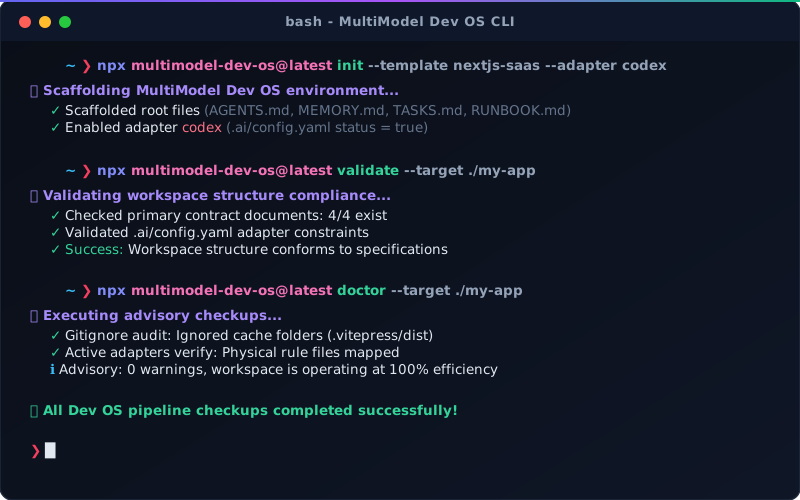
5 Guided Workflows
Select a workflow to get started:
| Workflow Demo | Description | Duration |
|---|---|---|
| 🚀 Safe Repo Onboarding | Safely analyze and bootstrap a real, existing project. | ~2 mins |
| 🔄 Universal Adapter Sync | Write rules once in AGENTS.md and sync Cursor, Claude, and Gemini. | ~1 min |
| 🤝 Multi-Agent Handoff | Seamlessly pass session context between terminal and editor agents. | ~2 mins |
| 🔁 Safe Improvement Loop | Capture user feedback, propose upgrades, and apply with safety gates. | ~3 mins |
| 🩺 Release Verification | Run pre-flight checks and verify version alignment before npm publishing. | ~1 min |
Under the Hood: Core CLI Commands
MultiModel Dev OS is a zero-dependency CLI. Here are the main commands that power these workflows:
1. Scaffolding & Setup
init: Bootstraps shared workspace contract files and enables target adapters.onboard analyze: Safely scans an existing repository to suggest the best template fit.
2. Synchronization & Verification
adapter sync: Pushes rules inAGENTS.mdout to.cursorrules,CLAUDE.md,.gemini/settings, and more.validate: Enforces structural compliance, perfect for pre-commit hooks and CI.doctor: Audits.gitignorehygiene and active adapter status.
For the full CLI command reference, see the CLI Documentation.